
Short Stack Hawaii LLC SMS Notifications
Version 1.0 · Last updated June 13, 2026
Short Stack Hawaii LLC offers optional work-related SMS notifications to authorized employees through the Short Stack Crew application. Messages may include published work schedules, shift changes, PTO request updates, task assignments, meeting reminders, account security notices, company announcements, and important operational alerts.
Employees voluntarily enable SMS notifications from their Short Stack Crew notification settings. SMS consent is optional and is not required to create an account, use the application, receive work assignments, or remain employed.
SMS Disclosure
By selecting Enable SMS Notifications, you agree to receive work-related text messages from Short Stack Hawaii LLC at the mobile number you provide. Messages may include schedule notifications, shift changes, PTO updates, task assignments, meeting reminders, account security notices, company announcements, and operational alerts. Message frequency varies based on employee activity. Message and data rates may apply. Reply STOP to unsubscribe or HELP for assistance. Consent is optional and is not a condition of employment or use of the Short Stack Crew application.
Messages you may receive
- Published work schedules
- Shift changes
- PTO request updates
- Task assignments
- Meeting reminders
- Account security notices
- Company announcements
- Important operational alerts
How Employees Opt In
Authorized employees opt in after logging into Short Stack Crew and navigating to Settings → Notifications → SMS Notifications. The employee enters or confirms a mobile phone number, reviews the SMS disclosure, and actively selects “I Agree - Enable SMS Notifications.” The employee may select “Not Now” and continue using the application without SMS. Consent is optional and is not required as a condition of employment, account creation, or access to the application.
The complete opt-in process
- The employee logs into Short Stack Crew.
- The employee opens Settings.
- The employee selects Notifications.
- The employee selects SMS Notifications.
- The employee enters or confirms their mobile phone number.
- The employee sees the complete SMS disclosure.
- The employee voluntarily selects “Enable SMS Notifications”.
- The employee may instead select “Not Now” and continue using the app without SMS.
- The system records the consent only after the employee actively confirms “I Agree - Enable SMS Notifications”.
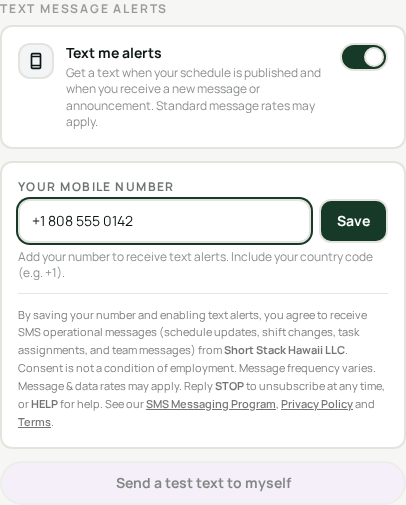
The employee enters or confirms their mobile number and reviews the full disclosure above.
Enable SMS Notifications is never preselected. The employee must actively confirm “I Agree - Enable SMS Notifications.”
The employee may choose Not Now and continue using all app features without SMS. They can opt out anytime by disabling SMS in settings or replying STOP.
Opting out
You can cancel at any time by replying STOP to any message, or by disabling SMS notifications in your settings. Reply HELP for assistance. Message frequency varies. Message and data rates may apply.
Privacy
Short Stack Hawaii LLC does not sell, rent, or share mobile phone numbers or SMS consent information with third parties or affiliates for marketing or promotional purposes. Mobile information may only be shared with service providers as necessary to deliver requested messaging services and comply with legal obligations.
Short Stack Hawaii LLC
Email: shortstackllc@gmail.com
Website: https://www.shortstackhawaiicrew.com
This page demonstrates the opt-in process and does not enroll public visitors into SMS messaging. Only authorized employees can opt in from within their Short Stack Crew account.